TL;DR
- LinkedIn ads are paid placements in the LinkedIn feed and inbox, targeted by job title, company, industry, and skills.
- Campaigns run through Campaign Manager: you choose an objective, an audience, a format, a budget, and a bid, and the ads go through review.
- The minimum daily budget is $10 and a click typically costs $5–$10, so a test you can draw conclusions from takes $500–$1,000 a month.
- LinkedIn pays off when deal value is high: B2B, hiring, education, events, and premium consumer offers.
- The free LinkedIn Ad Library shows real ads from any company and is the fastest way to research competitors.
On LinkedIn you can show an ad to finance directors at logistics companies with 200 or more employees, and to nobody else. That targeting is why B2B teams keep budget on the platform.
The trade-off is price: a click costs $5–$10, so setup mistakes get expensive fast. This guide explains how to run LinkedIn ads from scratch: how the auction works, where the ads manager is, how to set up a first campaign, which formats and sizes to use, and how much to budget.
LinkedIn Ads Explained: How They Work
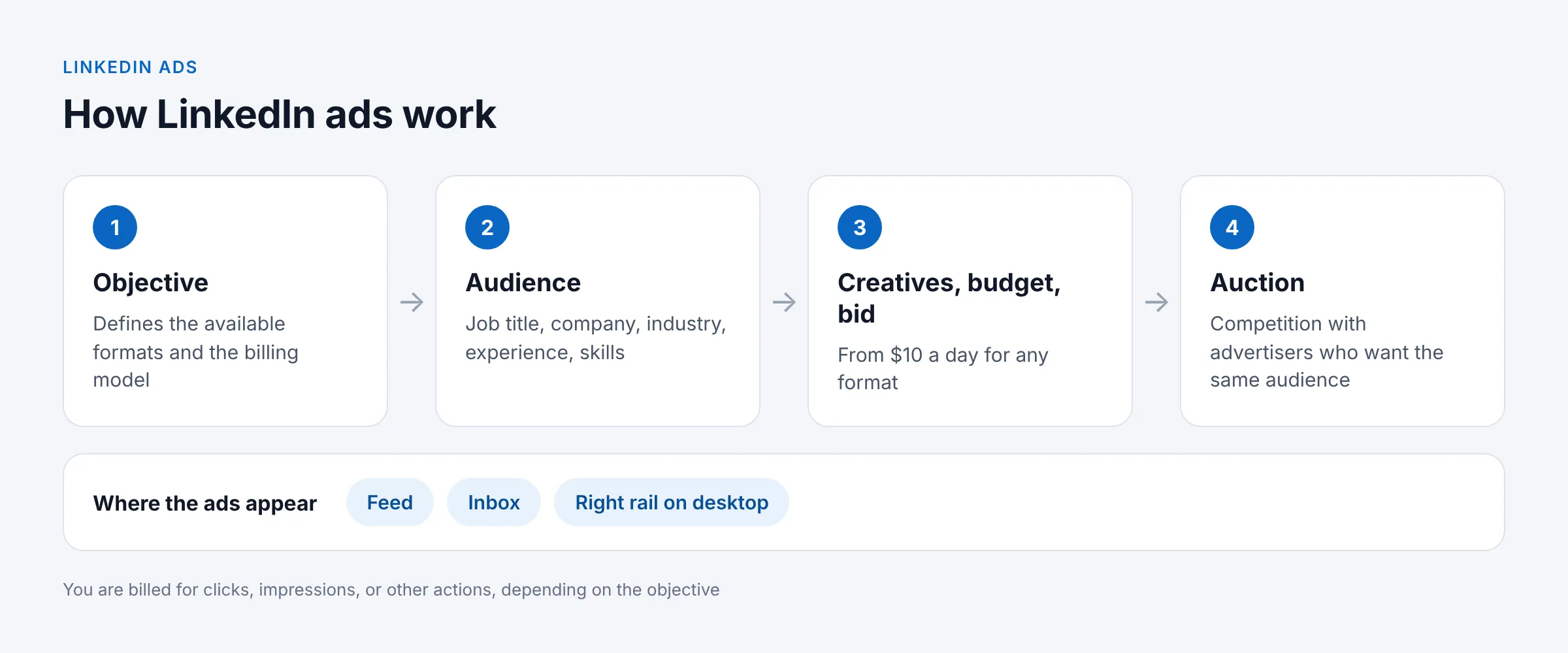
LinkedIn ads are paid placements inside LinkedIn: in the feed, in the inbox, and in the right rail on desktop. What sets them apart from other platforms is targeting by professional profile data: job title, company, industry, years of experience, and skills.
What LinkedIn ads do for a business:
- generate leads and contacts of decision-makers;
- drive traffic to a website or landing page;
- bring in job applications;
- build brand awareness in a narrow professional segment.
How LinkedIn ads work:
- Objective. It defines the available formats and what you are billed for.
- Audience. For example, marketing leaders at software companies in Germany.
- Creatives, budget, and bid.
- Auction. Your ad competes with other advertisers who want the same audience. The higher the demand for a segment, the more an impression costs.
You are billed for clicks, impressions, or other actions, depending on the objective.
Are LinkedIn Ads Worth It in 2026
LinkedIn ads are worth it when deal value is high and the sales cycle is long. If one customer brings in thousands of dollars, a $5–$10 click is a reasonable entry price. With a $20 order value, the math does not work.
Three arguments for the platform:
- Audience. LinkedIn has more than 1.3 billion members.
- Market verdict. In the Content Marketing Institute's B2B research, 85% of B2B marketers said LinkedIn delivers the best value of all social platforms. Facebook came second with 28%.
- Audience quality. Pew Research Center found that 53% of Americans with at least a bachelor's degree use LinkedIn, against 31% of all adults.
B2B is the main use case, but not the only one. LinkedIn works wherever the buyer can be defined by job, experience, or education:
- Hiring and employer branding. There is a dedicated objective for job applicants.
- Education. MBA programs, professional courses, and certifications.
- Events. Webinars and conferences, with a dedicated Event Ads format.
- Premium consumer offers. Financial services, real estate, and high-end products.
Low-priced mass-market products are a poor fit. They need a channel with cheaper reach.
LinkedIn Ads Manager: How to Log In
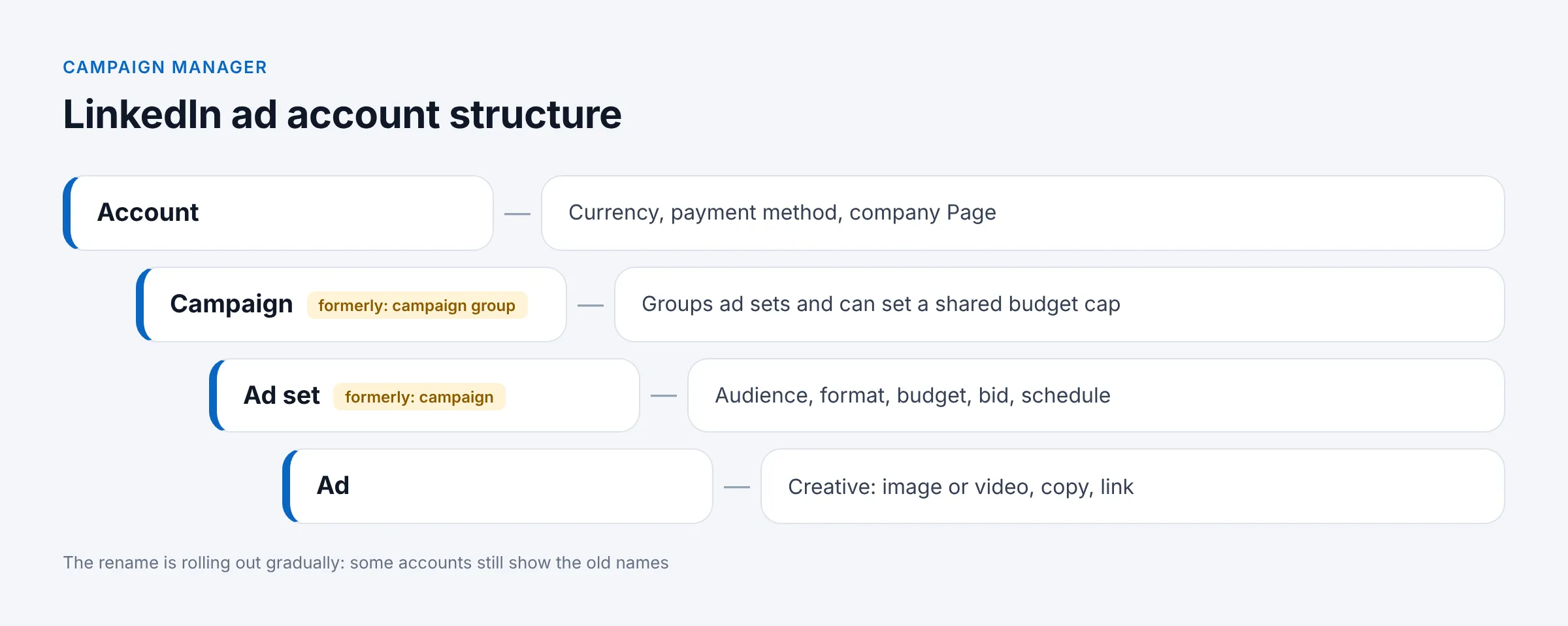
LinkedIn Ads Manager is the common name for LinkedIn's advertising account. Its official name is Campaign Manager. This is where you build campaigns, manage budgets, and read reports. Access is free, and you pay only for the ads.
How to log in:
- Go to linkedin.com/campaignmanager, or click Advertise in the top menu of LinkedIn.
- Sign in with your personal LinkedIn profile. Campaign Manager has no separate login.
- On the first visit, create an ad account: enter a name, select a currency, and link your company Page.
Check two things before launch:
- Company Page. Ads run on behalf of a Page. A personal profile cannot run a campaign.
- Account currency. It cannot be changed after the account is created.
In 2026 LinkedIn is updating the account structure: campaign groups are becoming campaigns, and campaigns are becoming ad sets. The rollout is gradual. If your account still shows the old names, the settings work the same way.
How to Run LinkedIn Ads: 7 Setup Steps
Setting up LinkedIn ads takes seven steps in Campaign Manager.
- Create an ad account. Log in to Campaign Manager and add a payment card.
- Install the Insight Tag. The Insight Tag is LinkedIn's tracking pixel: a piece of code on your website that records conversions and builds retargeting audiences. Install it before launch, or you will not know which ads bring leads.
- Choose an objective. It defines the formats, the bidding strategy, and the billing model. The options are in the table below.
- Build the audience. Location is the only mandatory field. Then add company, job, and skills. The technical minimum is 300 members, and LinkedIn recommends 50,000 or more for stable delivery.
- Choose a format. A single image ad is enough for a first test.
- Set the budget and bid. The minimum is $10 a day for any format. Start with the automated Maximum delivery strategy. Move to manual bidding once you know your real cost per result.
- Upload creatives and submit them for review. Make two to four versions that differ in one element, so you can tell what made the difference. LinkedIn strives to review ads within 24 hours.
Which objective to choose:
Objective | Choose it when |
|---|---|
Brand awareness | You need reach and recognition in a defined segment |
Website visits | You have a strong landing page and need traffic |
Engagement | You need Page followers and interaction |
Video views | The product is easier to explain in a video |
Lead generation | You need leads through a form inside LinkedIn |
Website conversions | You need sign-ups or purchases on your site |
Job applicants | You are filling vacancies |
Three rules for a first campaign:
- Start with Lead generation. The lead form opens inside LinkedIn and is pre-filled with profile data. A prospect submits it in one click, and the result does not depend on the quality of your landing page.
- Target by job function and seniority, not by exact job titles. The same role has different titles in different companies, so title-only audiences end up too narrow.
- Leave the campaign alone for the first one to two weeks. The algorithm needs data, and daily edits keep it from accumulating.
LinkedIn Ads Examples by Format
LinkedIn offers more than ten ad formats. The table lists the main ones with typical use cases. These are examples of tasks, not real campaigns.
Format | What it looks like | Typical use case |
|---|---|---|
Single image | A post with an image in the feed | One benefit and a "Download" button |
Video | A video in the feed | A 30-second product demo |
Carousel | Swipeable cards | Five product features, one per card |
Document ads | A PDF readable in the feed | An industry report in exchange for contacts |
Event Ads | A post with a date and a sign-up button | Registrations for a webinar |
Thought Leader Ads | A sponsored post from a personal profile | A founder's post about a product launch |
Conversation Ads | A direct message with reply buttons | A personal invitation to a demo |
LinkedIn also offers text ads, dynamic ads, and Connected TV ads.
How to Run Thought Leader Ads
Thought Leader Ads sponsor a post from a personal profile: an executive, an employee, an industry expert, or a customer. Use it when trust matters: a post from a named person reads as regular content, not as a brand ad.
- In Campaign Manager, choose one of the supported objectives: Brand awareness, Engagement, or Video views.
- Find the post you want to promote and send the author a sponsorship request.
- Wait for approval: the author receives a notification and accepts the request.
- Launch the ad. It runs under the author's name.
Conversation Ads Example
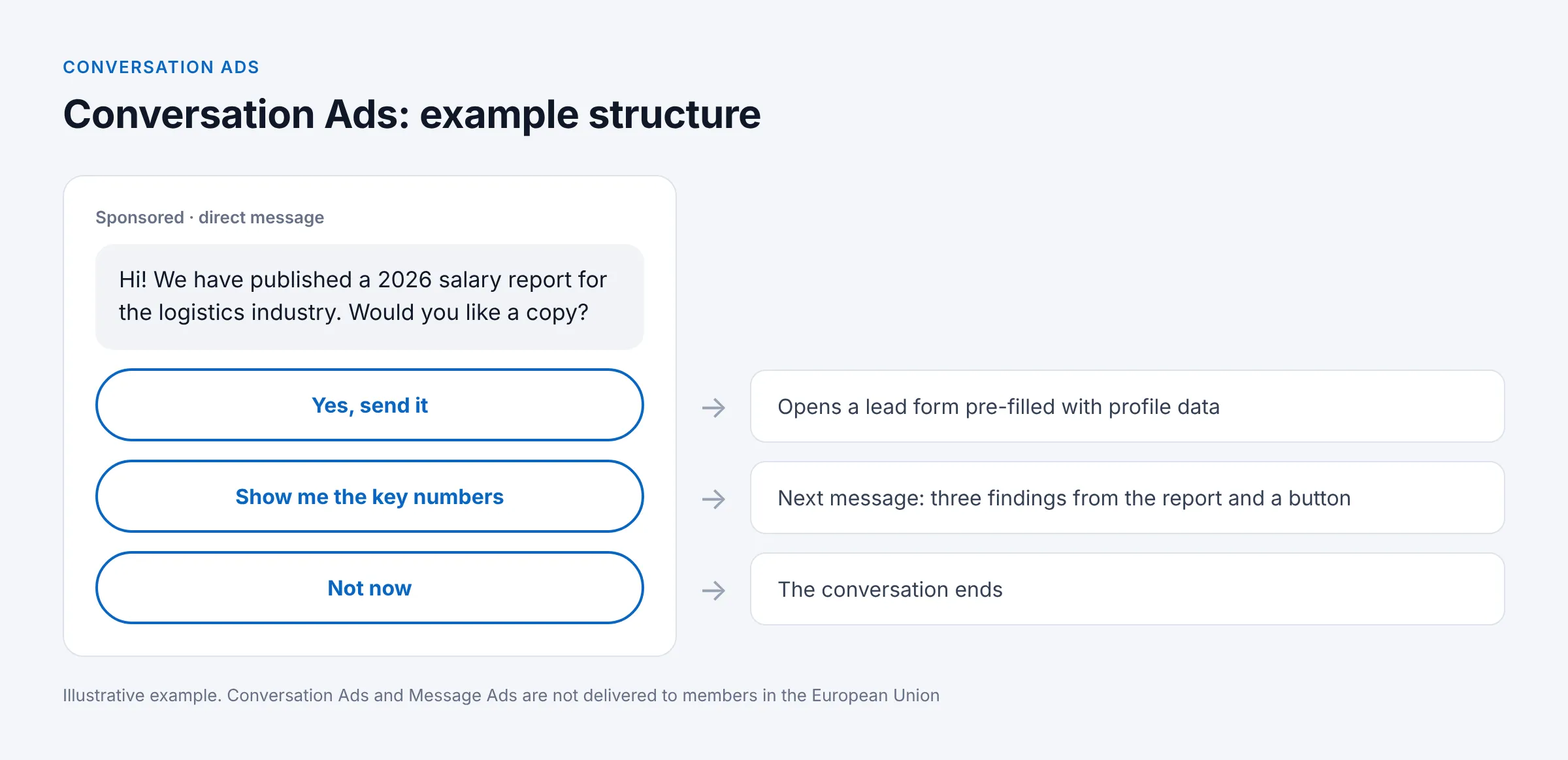
A Conversation Ad is a sponsored message with buttons: the next step of the dialogue depends on which button the recipient clicks. An illustrative structure:
- Opening message: "Hi! We have published a 2026 salary report for the logistics industry. Would you like a copy?"
- Button 1: "Yes, send it" opens a lead form.
- Button 2: "Show me the key numbers" leads to a message with three findings from the report.
- Button 3: "Not now" ends the conversation.
One limit for European campaigns: Conversation Ads and Message Ads are not delivered to members in the European Union.
LinkedIn Ads Library: How to Search
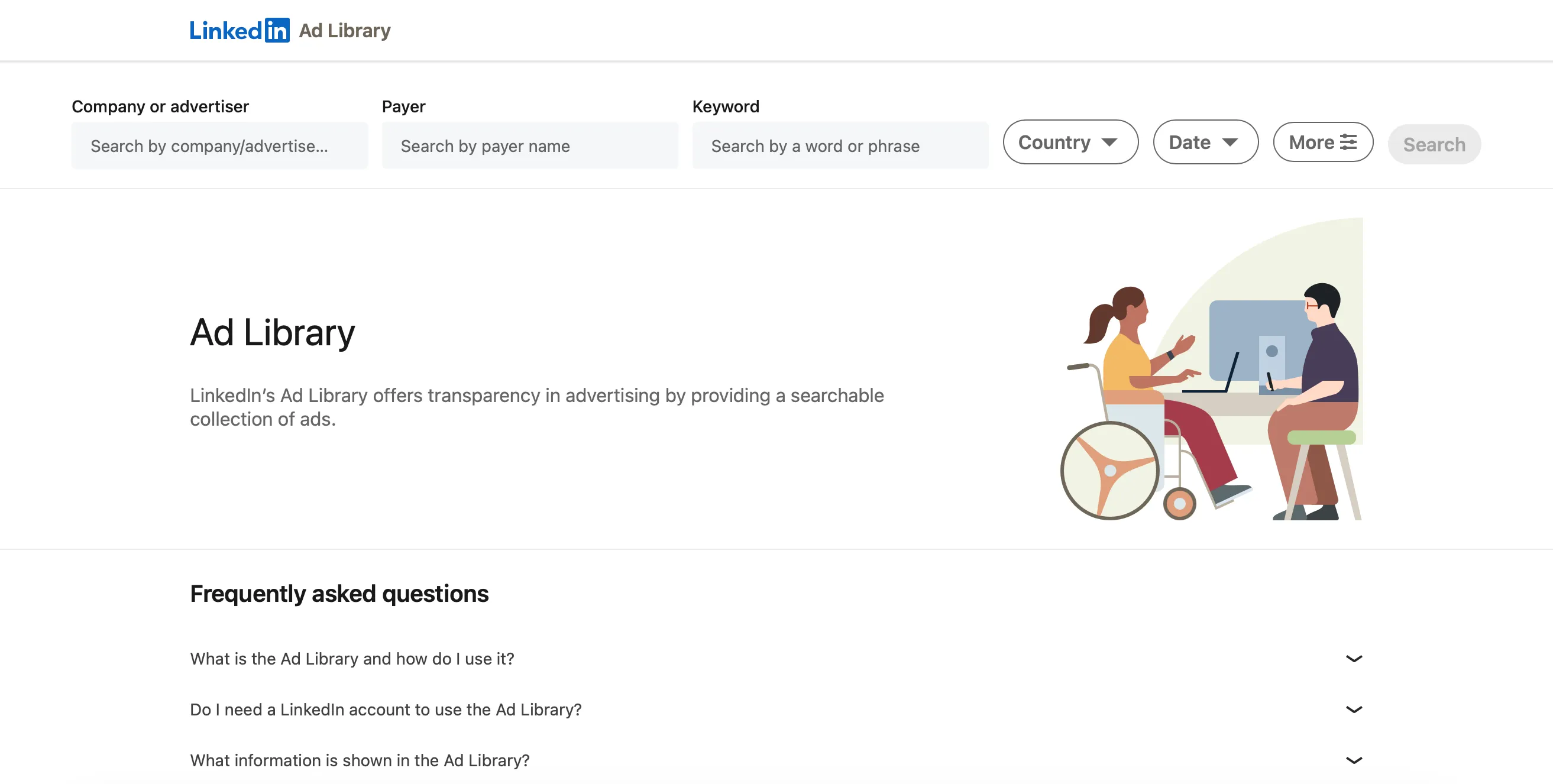
The LinkedIn Ad Library is a free public catalog of ads running on LinkedIn. Its practical value is fast competitor research: before launch, you can see which formats and offers companies in your niche use.
How to search for ads:
- Open linkedin.com/ad-library.
- Enter a company name or a keyword.
- Set the country and the date range.
- Open an ad: the details show the format, the advertiser, and the payer.
The library does not show budgets or results. An indirect sign of performance is how long an ad has been running: if a company has kept the same ad live for months, it is probably paying off.
LinkedIn Ads Sizes and Specs
The default LinkedIn ad size is a 1200 × 1200 pixel square image. LinkedIn recommends it for delivery on both desktop and mobile.
Format | Recommended size | File |
|---|---|---|
Single image, square | 1200 × 1200 px (1:1) | JPG, PNG, or GIF, up to 5 MB |
Single image, horizontal | 1200 × 628 px (1.91:1) | JPG, PNG, or GIF, up to 5 MB |
Single image, vertical | 720 × 900 px (4:5), mobile only | JPG, PNG, or GIF, up to 5 MB |
Carousel card | At least 1080 × 1080 px (1:1), 2–10 cards | JPG or PNG, up to 10 MB |
Video | 16:9, 1:1, 4:5, or 9:16 | MP4, up to 500 MB, 3 seconds to 30 minutes |
Text limits in LinkedIn's single image specs: up to 70 characters for the headline and 150 for the introductory text. Video ads allow up to 600 characters of introductory text, but LinkedIn recommends staying within 150 so that it is not truncated.
How Much Do LinkedIn Ads Cost
LinkedIn ads cost from $10 a day, which is the minimum daily budget. The actual price is set by the auction: the more competition for your audience, the more a click costs.
Benchmarks from third-party data compiled by Hootsuite:
- $5–$10 per click (CPC);
- $30–$60 per 1,000 impressions (CPM);
- $60–$175 per lead (CPL).
These are averages. Senior audiences in the US and Western Europe cost more.
How to size a test budget. At $25 a day and $5–$10 per click, you get 2–5 clicks a day, or 75–150 clicks a month for $750. That is enough to compare two ads. So plan $500–$1,000 for the first month: a smaller budget will not produce enough data.
Judge the channel by cost per qualified lead, not by cost per click: an expensive click from a decision-maker is often worth more than a cheap one from the wrong audience.
That said, LinkedIn rarely works alone. Many advertisers run a channel mix: LinkedIn for precise reach by job title, with Meta Ads and Telegram Ads adding cheaper reach and repeat touches. Compare the channels in the mix by the same metric, cost per qualified lead.
If Telegram is new to you, start with the complete guide to Telegram Ads and see how much Telegram ads cost. These campaigns can be launched through AdsGram, an official Telegram Ads reseller. For details, see the page on advertising in Telegram.
Advertising That Converts
FAQ
- How much does a LinkedIn ad cost?
A LinkedIn ad costs from $10 a day, the minimum daily budget for any format. The actual price is set by the auction. Third-party benchmarks put a click at $5–$10 and 1,000 impressions at $30–$60. Plan $500–$1,000 a month for a first test. - How much does LinkedIn cost for advertisers?
LinkedIn itself is free for advertisers. A personal profile, a company Page, and the Campaign Manager account cost nothing. You pay only for the ads, with a minimum budget of $10 a day. LinkedIn Premium is a separate paid subscription, and it is not required to run campaigns. - Are LinkedIn ads worth it?
LinkedIn ads are worth it when deal value is high, the sales cycle is long, and the buyer can be defined by job title, company, or industry. They suit B2B, hiring, education, events, and premium consumer offers. For low-priced mass-market products they rarely pay off, because a click costs several dollars. - What do LinkedIn ads do?
LinkedIn ads put your message in front of people selected by job title, company, industry, and skills. Businesses use them to generate leads, drive website traffic, and collect job applications. The ads compete in an auction and appear in the feed, in the inbox, and in the desktop right rail. - How do I log in to LinkedIn Ads Manager?
Click Advertise in the top menu of LinkedIn. Sign in with your personal profile: LinkedIn Ads Manager, officially called Campaign Manager, has no separate login. On the first visit, create an ad account by entering a name, selecting a currency, and linking your company Page. - Where can I find LinkedIn ads examples?
Real LinkedIn ads examples are collected in the LinkedIn Ad Library. It is a free public catalog. Enter a company name or a keyword, then set the country and date range. Each ad shows its format and advertiser, but budgets and results are not disclosed.