Telegram Ads in 2026: The Complete Guide to Formats, Costs, and Launching Your First Campaign
This guide is written for advertisers preparing a first Telegram Ads campaign: performance marketers, growth leads, and founders who need to know what the format can carry, what determines the price, and what the launch sequence looks like before any money moves. It covers the native mechanics of Telegram Ads, the creative and targeting parameters available in 2026, and the two routes an advertiser can take into the auction.
TL;DR
Telegram Ads is Telegram's native advertising system, which serves short sponsored messages inside public broadcast channels, bot chats, and global search results. Ad text is capped at 160 characters and can be accompanied by regular and custom emoji, a banner image, or a video, plus a call-to-action button.
Pricing runs on a CPM auction: the advertiser sets a bid per thousand impressions, and the bid influences how much of the available inventory the campaign wins. Sponsored messages appear only in public channels with 1,000 or more subscribers, and Telegram Premium subscribers do not see them.
Campaigns can be launched either through Telegram's own TON-denominated cabinet or through the Adsgram advertiser cabinet, which settles in USDT and accepts external landing pages in addition to Telegram destinations.
What Telegram Ads is and how sponsored messages work
Telegram Ads is the advertising system operated by Telegram itself, and a sponsored message is the single ad unit it delivers. The unit is a short block of text with an optional media attachment and a button, rendered inside the messenger rather than in a banner slot. According to Telegram's own ad platform page, sponsored messages are shown in public broadcast channels with 1,000 or more subscribers, and 50% of the revenue from Telegram Ads goes to the owners of the channels where those messages are displayed. Telegram also states that its ads do not rely on users' personal information and are based on the channels in which they are shown.
Where Telegram Ads sponsored messages appear in 2026
Sponsored messages currently render in three distinct surfaces, and each one catches the user in a different state. Telegram's sponsored messages API reference documents all three: in channels, the message is displayed below all other posts once the user scrolls far enough down; in bots, it is positioned above the chat as an action bar; and in global search, sponsored results are served alongside organic ones.
The three surfaces share one creative specification, so a single ad set can cover all of them without separate production.
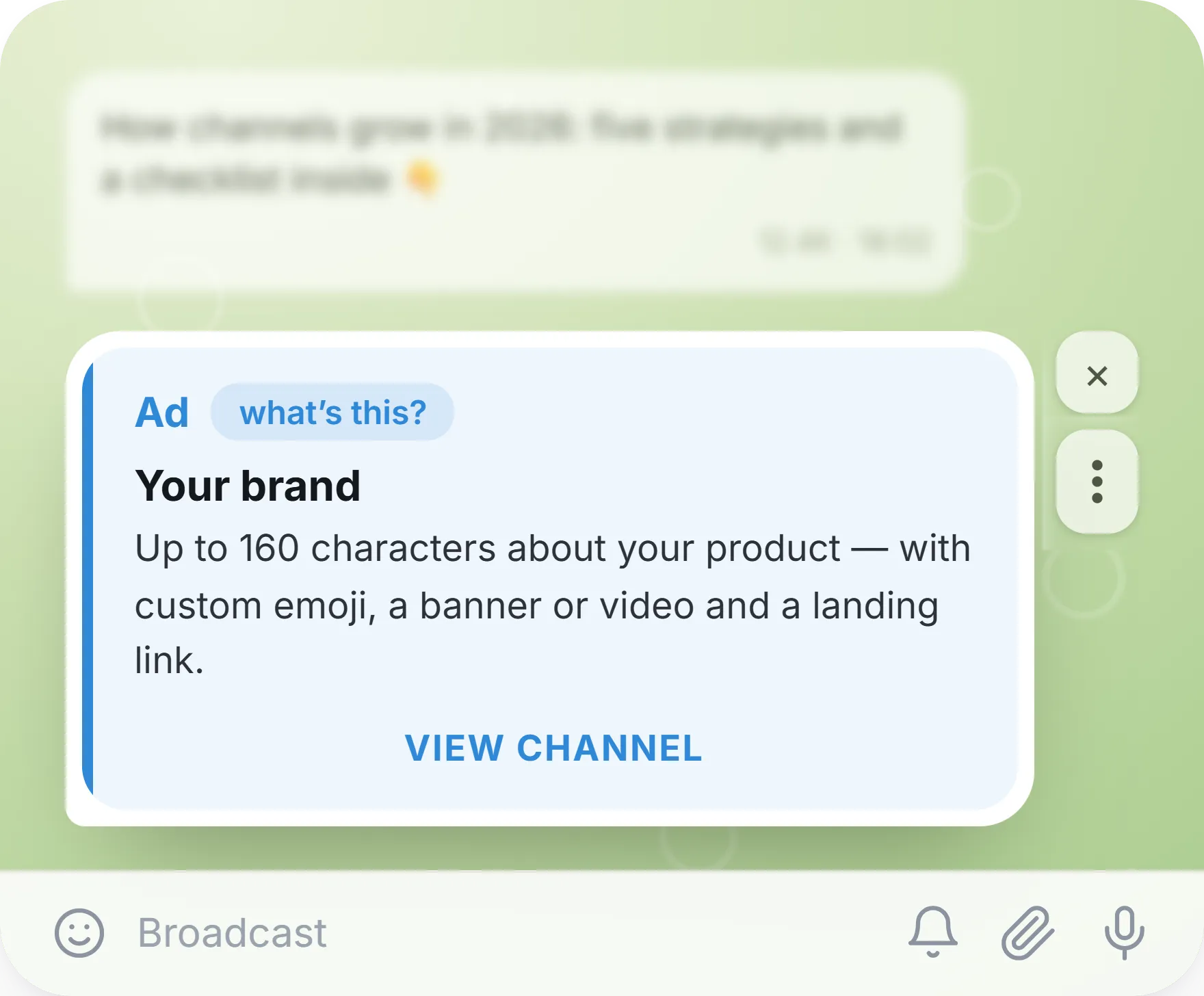
Telegram Ads placement example in Telegram channel
One exclusion applies across every placement. Telegram's Terms of Service state that Premium subscribers do not see sponsored messages, although channel administrators may still publish their own promotional posts, which Premium users do encounter.
Placement | How the ad renders | What the user is doing | Strongest fit |
|---|---|---|---|
Public channel | Below the channel feed, after the user scrolls | Reading content in a topic they follow | Awareness and subscriber growth |
Bot chat | Action bar above the chat window | Actively using a service | App installs, service cross-sell |
Global search | Sponsored result next to organic results | Looking for something specific | High-intent acquisition |
Telegram Ads creative formats and requirements
A Telegram Ads creative is a short message, not a layout, and the constraints are tight enough that copy discipline determines most of the outcome.
Ad text is limited to 160 characters, and Telegram's platform documentation confirms that the destination URL is rendered as a button beneath the message. Regular and custom emoji are supported inside the text, and the sponsored message object also carries a photo or video field, a title, button text, and an accent colour, according to the API reference. For video creatives the object additionally carries minimum and maximum display duration values, which is the mechanism that keeps a video ad on screen long enough to register.
Because there is no room for a value proposition and a proof point and a call to action in 160 characters, the practical approach is to carry one claim in the text and let the media carry context. A wider treatment of how each Telegram surface handles creative is available in the breakdown of advertising formats available across Telegram. The specifications below reflect the fields exposed in the Adsgram advertiser cabinet, per the Adsgram Telegram Ads documentation.
Creative element | Limit or specification | Operational note |
|---|---|---|
Ad text | Up to 160 characters | One claim per ad; test claim variants, not synonym variants |
Site name | Up to 40 characters | Displayed as the advertiser identity line |
Link | Up to 256 characters | Long UTM strings consume the budget quickly |
Button text | Editable, default "Open" | Match the button verb to the destination type |
Photo | JPEG or PNG, 16:9, 640×360 to 1920×1080 | Crop for the small render size, not for a desktop preview |
Video | MP4, up to 20 MB, 3–60 seconds | Front-load the message into the first three seconds |
Emoji | Regular and custom emoji supported | Custom emoji reinforce brand recognition inside the text line |
How pricing works in the Telegram Ads auction
Telegram Ads is priced on CPM, and the advertiser's bid is an input to an auction rather than a rate card entry. CPM is cost per mille — the amount paid per one thousand impressions. The bid does not purchase a fixed volume; it determines how competitive the campaign is against other advertisers targeting the same channels, topics, and regions, and therefore how much of the available inventory the campaign wins and how visible the message is within it. As a result, cost planning for advertising in Telegram starts with the bid and the daily budget, not with a published price per placement.
Two behaviours follow from the auction structure.
First, the effective cost of a campaign moves with competitive pressure on the specific segment being targeted, so identical bids in different geos or topics produce different delivery.
Second, delivery is throttled by the daily budget, which means a bid that is competitive but a budget that is small produces a slow, thin campaign rather than a cheap one. The trade-off here is between speed of learning and cost per unit of learning: a higher bid buys a faster read on whether the creative works, and a lower bid stretches the same budget across more days at the cost of slower feedback.
How targeting works in Telegram Ads campaigns
Targeting in the native Telegram system is contextual rather than personal. Telegram's ad platform documentation describes the core mechanism as defining the specific channels in which the ads should appear, so that the context around the message is relevant. There is no behavioural or demographic profile behind the impression, which is a privacy property of the system.
The depth of that parameter set depends on the cabinet the advertiser enters through, which is covered in the next two sections.
The general principle holds regardless: a narrow, well-chosen channel or topic set with a competitive bid usually outperforms a broad set at the same spend, because the creative is written for one context and not for an average of several. The mechanics of building those segments are described in more detail in the guide to targeted advertising in Telegram Ads.
Launching Telegram Ads through the Adsgram advertiser cabinet
Telegram Ads campaigns can be launched through Adsgram, which operates as an official reseller. Campaigns created this way run on the same infrastructure and the same sponsored message inventory as those created in Telegram's own cabinet; what changes is the interface, the settlement currency, and the range of parameters exposed at setup. Inside the Adsgram advertiser cabinet, Telegram Ads appears as a dedicated campaign type alongside the platform's Mini App, channel, and bot campaigns, so a single account covers both Telegram Ads and Adsgram's own network placements.
The Adsgram Telegram Ads cabinet offers two campaign formats:
- Users targets people rather than places: the advertiser sets a target country and user language, and can layer topics, the audiences of specific channels, and device type on top.
- Channels targets placements directly: the advertiser sets the channel language and names the channels where the post should appear. The choice between them is a choice about which signal is more reliable for the product — a known audience profile, or a known list of publications.
Launch Telegram Ads with AdsGram
Launch support, creative pre-moderation and targeting you won’t get with direct placement.
The destination is not restricted to Telegram objects: campaigns launched through the Adsgram cabinet can point at external landing pages as well as channels, bots, business accounts, and Mini Apps.
Adsgram cabinet and TON cabinet compared for Telegram Ads
Telegram's own self-serve cabinet is denominated in Toncoin, and its platform documentation is explicit that the ad URL must point to a channel or bot on Telegram, in the format t.me/link or @link — external site links are not accepted there.
That single constraint decides the route for a large share of advertisers, because a campaign selling a subscription, a mobile app, or an e-commerce product usually needs to land on its own page.
Parameter | Adsgram Telegram Ads cabinet | Telegram TON cabinet |
|---|---|---|
Settlement currency | USD / USDT, no Toncoin purchase required | TON |
Auction position | Elevated priority, affecting visibility and effective CPM | Standard |
User-level targeting | Available | Not available |
Country targeting | Available, 25+ countries | Not available |
Landing destinations | Telegram objects (channels, bots, business accounts, Mini Apps) and external URLs | Telegram objects only |
Creative options | Text, regular and custom emoji, banner or video | Text, regular and custom emoji, banner or video |
Campaign formats | Users and Channels | Channel-based placement |
Both cabinets run on official Telegram Ads infrastructure, so the inventory, the 160-character limit, the 1,000-subscriber threshold, and the Premium exclusion apply identically. The Adsgram cabinet adds the parameters above on top of that shared base, which is what makes it the broader fit when the campaign has a destination outside Telegram or a target audience defined by country and language rather than by a channel list.
What funding a first Telegram Ads campaign requires
Two numbers define the entry point for a Telegram Ads campaign in the Adsgram cabinet. The minimum daily budget is 10 USDT. The first campaign in a given region and language combination also requires a 500 USDT reserve, which is frozen on the account rather than spent, and which is released back within 24 hours if the campaign is declined at moderation. The reserve is used exclusively for Telegram Ads campaigns, and subsequent campaigns in the same region and language combination do not require a new one.
The distinction between reserved and spent funds is worth holding onto during planning, because it changes what the first deposit has to cover. The reserve secures the region; the daily budget buys the impressions. An advertiser opening two regions sequentially therefore front-loads more capital than one scaling depth inside a single region, and the sequencing of geo tests should account for that. Moderation runs before every start, so the working assumption for a launch schedule is that a campaign is submitted, reviewed, and then begins delivery rather than going live on submission.
Launching a Telegram Ads campaign in five steps
The launch sequence in the Adsgram cabinet runs from registration to active delivery without leaving the interface. The steps below follow the platform's Telegram Ads documentation, including the button names as they appear in the dashboard. One parameter group deserves attention before starting: targeting is fixed at ad creation and cannot be edited afterwards, so the segment has to be decided before the creative is saved.
- Register an advertiser account. Create the account in the Adsgram advertiser dashboard and complete the balance setup.
- Open the campaign builder. On the Campaigns page, select Create campaign, then choose Telegram Ads as the campaign type and pick the format — Users for audience-based targeting, Channels for placement-based targeting.
- Assemble the creative. Enter the link (up to 256 characters), site name (up to 40 characters), ad text (up to 160 characters), and button text. Attach a photo or a video within the specifications listed earlier. The live preview shows the message as the audience will see it.
- Configure targeting. For the Users format, set the target country and user language, then add topics, channel audiences, and device type. For the Channels format, set the channel language and name the target channels. These values lock once the ad is created.
- Set the strategy and launch. Enter the CPM bid and the daily budget, then select Create Campaign And Launch. Confirm the reserve if this is the first campaign in the region and language. The campaign moves to moderation and reaches "Ready to start" once approved.
Moderation rules and what triggers a re-review
Every Telegram Ads campaign passes moderation before it starts delivering, and the rule that governs iteration is narrow: changes to ad content require re-moderation, while changes to strategy do not. In practice this means bid adjustments and daily budget changes can be made on a live campaign without interrupting delivery, whereas editing the text, the link, or the media sends the ad back for review. Targeting sits outside both categories, since those parameters cannot be edited after creation at all.
The operational consequence is that creative iteration should be structured as parallel ads rather than sequential edits. Running three text variants as three ads keeps all of them in delivery while the data accumulates; editing one ad three times pauses it for review each time and fragments the read. Preparing the full creative set, the destination URLs with tracking parameters attached, and the targeting decision before the first submission removes most of the re-moderation cycles from a launch week.
Measuring Telegram Ads results and attributing conversions
Campaign-level reporting inside the cabinet answers how much was spent and how many impressions and clicks were delivered; it does not answer what happened after the click. Closing that gap requires the destination to be instrumented before launch. For external landing pages that means UTM parameters on the link, kept short enough to fit inside the 256-character limit. For app and Mini App destinations it means a mobile measurement partner in the path, with Adsgram supporting integrations including AppsFlyer, Adjust, AppMetrica, Keitaro, and Kochava.
A postback is the exchange of information between servers reporting a user action back to the acquisition source, as defined in AppsFlyer's attribution glossary. Without one configured, a Telegram Ads campaign can only be optimised on impressions and clicks, which is a proxy for value rather than a measure of it. With one configured, install and in-app event data flows back and the campaign can be judged on cost per action across channels, topics, and geos. Channel-level performance patterns from other Telegram surfaces are covered in the practical guide to advertising in Telegram channels.
Common mistakes in a first Telegram Ads campaign
Most delays on a first launch happen before a single impression is served, at the moderation stage. The three mistakes below are the ones that send a campaign back for review or waste the first days of delivery, and all three are avoidable with preparation rather than experience. None of them require a second attempt to learn.
- Building the creative without checking the requirements first.
The specification is narrower than most ad platforms: ad text is capped at 160 characters including spaces, the site name at 40, and the link at 256. Telegram's ad policies and guidelines also cover style, and they rule out line breaks, bullet points, numbered lists, gimmicky capitalisation or spacing, and intrusive emoji use — the ad has to read as a normal sentence. Media has its own limits: a photo in 16:9 between 640×360 and 1920×1080, or an MP4 video of 3 to 60 seconds under 20 MB. Reading the specification before the designer and the copywriter start removes an entire round of rework. - Promoting a category that Telegram Ads does not accept.
Telegram publishes a list of prohibited subjects, and it is broader than many advertisers expect: gambling, political campaigns and religious movements, drugs, alcohol and tobacco, weapons, predatory loans and pyramid schemes, unverified medical claims, and deceptive or clickbait messaging are all outside the rules. Ads must also match the language of the destination and the targeted channel. Checking the product and the claim against that list before writing the brief is faster than discovering the problem at moderation, and it prevents a rejection cycle on a launch deadline. - Sending traffic to a destination that is not ready.
The ad is approved, the bid is competitive, and the traffic lands on a channel with three posts or a bot with no onboarding message. Delivery works, but the conversion does not, and the campaign gets blamed for a landing problem. Before launch, open the destination as a new user would see it — first screen, first message, first call to action — and confirm the tracking parameters resolve on a live click.
Telegram Ads FAQ for first-time advertisers
- How much does it cost to start advertising on Telegram Ads?
Cost is set by the advertiser rather than by a rate card, because Telegram Ads runs on a CPM auction. Through the Adsgram cabinet the minimum daily budget is 10 USDT, and the first campaign in a new region and language combination requires a 500 USDT reserve that is frozen rather than spent. The effective cost per thousand impressions depends on competition for the targeted channels, topics, and geography. - Can a Telegram Ads campaign send traffic to an external website?
It depends on the cabinet. Telegram's native TON cabinet requires the ad URL to point to a Telegram channel or bot, in the formatt.me/linkor@link, and does not accept external site links. Campaigns launched through the Adsgram advertiser cabinet can point at external URLs as well as Telegram channels, bots, business accounts, and Mini Apps. - Do Telegram Premium users see sponsored messages?
No. Telegram's Terms of Service state that Premium subscribers do not see the sponsored messages served by Telegram Ads. Premium users still see promotional posts published by channel administrators themselves, since those are ordinary channel content rather than sponsored messages. The addressable audience of a Telegram Ads campaign is therefore the non-Premium share of each channel's readership. - Is TON required to pay for Telegram Ads?
Not when the campaign runs through the Adsgram advertiser cabinet, where Telegram Ads campaigns are settled in USDT and no Toncoin purchase is needed. Telegram's own self-serve cabinet is denominated in Toncoin, so an advertiser entering there acquires TON first. The underlying ad inventory is identical in both cases. - How long does Telegram Ads moderation take before a campaign starts?
Moderation runs before every campaign start, and the campaign moves to "Ready to start" status once it is approved. Review time is not fixed, so launch schedules should treat submission and delivery as separate days rather than the same one. Changes to ad content trigger a new review, while bid and daily budget changes do not. - Can targeting be changed after a Telegram Ads campaign is launched?
No. Targeting parameters are fixed at the moment the ad is created and cannot be edited afterwards. Adjusting a segment means creating a new ad with the corrected parameters. Strategy settings behave differently: the CPM bid and the daily budget can be changed on a running campaign without re-moderation.
How to launch a Telegram Ads campaign with Adsgram
Adsgram runs these campaigns on official Telegram Ads infrastructure, with USDT settlement, user and country targeting, and support for external landing pages alongside Telegram destinations — the combination that covers the widest set of Telegram-native scenarios in one account. Campaign setup starts in the Adsgram advertiser dashboard.