Your campaign comes back as Declined, with nothing else attached. Most of the time the product was never the problem — it was one exclamation mark too many, the word "best," a shortened link, or a landing page that doesn't load from the country you're targeting.
This guide walks through Telegram Ads requirements in order: what the platform is and what its rules say, which limits are hard, how to rewrite a rejected creative, and how the two dashboards you can launch from differ.
TL;DR
- Telegram Ads requirements are set by the messenger itself: the official Ad Policies define ad format, acceptable links, destination quality and the list of closed categories.
- Ad text is capped at 160 characters, and all-caps, superlatives, more than one exclamation mark, income promises and informal address are all prohibited.
- Links must be HTTPS, with no URL shorteners and no tracking macros, and must point to a working page whose content matches the ad text.
- Telegram Ads campaigns are reviewed in 24–48 hours on business days, with moderation running 08:00–22:00 UTC.
- Editing ad text or creative sends the campaign back into review, changing bid or budget does not, and targeting cannot be changed at all once the ad is created.
What Telegram Ads is
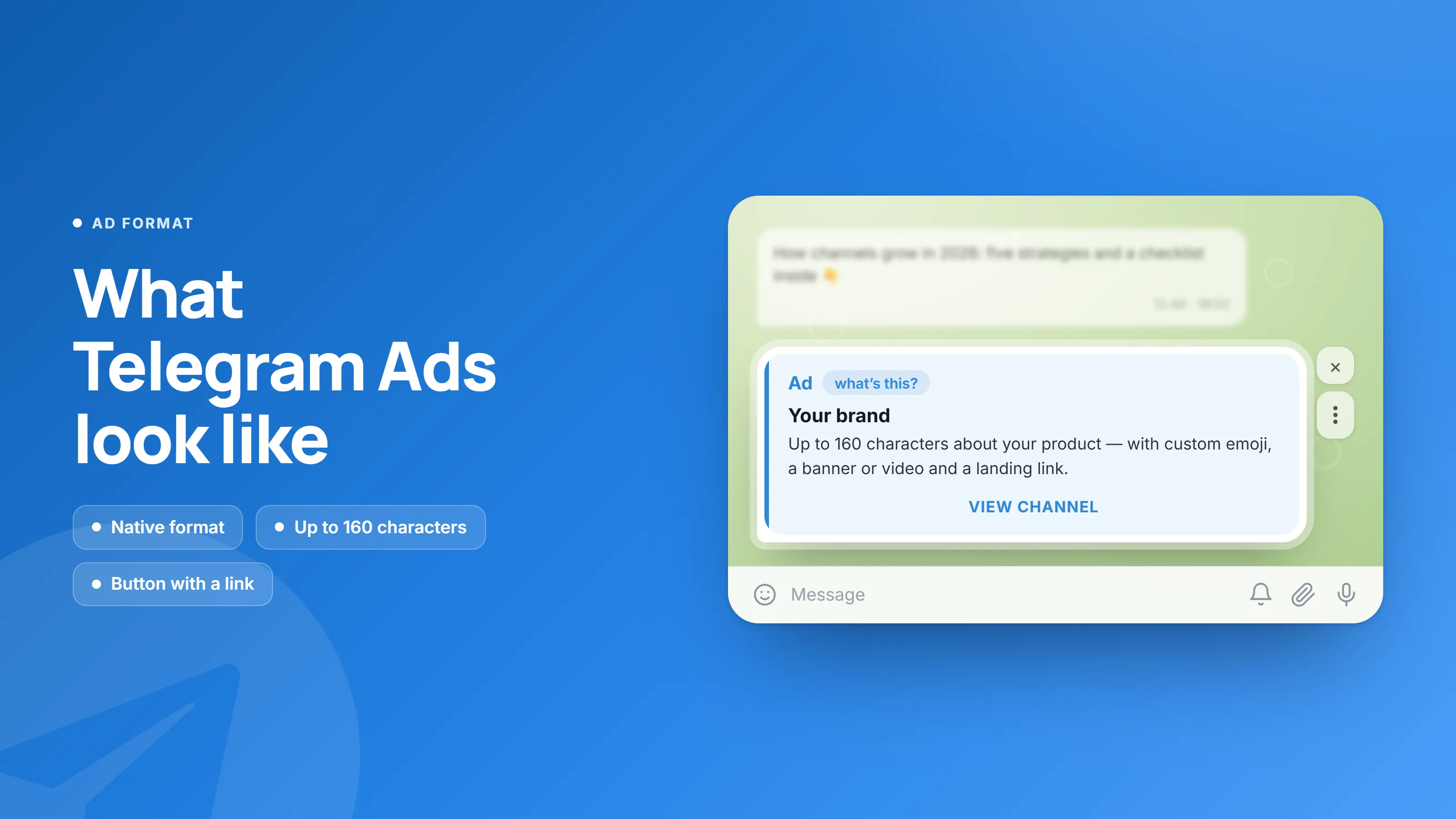
Telegram Ads is the messenger's official advertising platform. An ad consists of text up to 160 characters and a button with a link, shown inside the Telegram interface and labelled Sponsored.
The rules live in one document, Ad Policies and Guidelines, covering ad format, acceptable links, destination requirements and prohibited categories. Under the Telegram Ad Platform Terms of Service, the advertiser is responsible for making sure the materials comply with those policies and with the law of the countries where they run.
Available campaign types:
- Users — flexible audience targeting: country, language, topics, audiences of specific channels, device type.
- Channels — a post in channels with text, a URL and an image or video.
- Bots — messages in bots with a title, text and a URL.
- Search — ads shown in Telegram Search.
Telegram Ads isn't the only way to buy traffic in the messenger — direct post placements with channel owners and ad networks inside Mini Apps and bots run in parallel. The AdsGram breakdown of Telegram ad formats covers what goes where.
Prohibited categories in Telegram Ads
The list of closed categories is the same for every advertiser. If your product falls into one of them, rewriting the creative won't help — the destination itself won't clear review.
What doesn't pass:
- Graphic and adult content — violence, gore, sexual or sexually suggestive material, vulgar imagery.
- Hate and discrimination — harassment, bullying, insults toward people or brands, incitement of hatred.
- Dating — dating services, bots and channels.
- Gambling — casinos, betting, lotteries, sports forecasts and tipping "signals."
- Deceptive finance — pyramid and MLM schemes, get-rich-quick offers, guaranteed returns, insider investment tips, unlicensed crypto offerings, payday and short-term loans.
- Unlicensed medicine — uncertified services, supplements, medicines without regulatory approval, unrealistic health claims.
- Substances and weapons — drugs, alcohol, tobacco and vapes, firearms, ammunition, explosives.
- Software and hacking — malware, spam tools, hacking services, follower and view inflation, phishing.
- Politics and religion — political campaigns, parties, candidates, religious movements, ongoing sensitive events.
- Third-party rights — pirated content, other companies' trademarks and logos, impersonating a brand or public figure.
- Products of questionable legality — forged documents, stolen data, counterfeit goods.
There's also a general clause: submissions are additionally assessed against the law of the countries where they will run, so a vertical that's acceptable in one jurisdiction may be restricted in another.
Ad text requirements
Ad text is limited to 160 characters including spaces and must be written in a neutral tone, with no pressure on the reader.
Prohibited:
- All-caps. Only pre-approved brand names may use them.
- Superlatives and subjective claims — "best," "No. 1," "unique," comparisons against competitors.
- More than one exclamation mark per ad. Excessive punctuation in general is not allowed.
- Informal or over-familiar address and slang.
- Earnings promises — "$5,000 a day," guaranteed returns, lifestyle claims.
- Clickbait and scare tactics — "you just won," "so you don't get scammed," capitalizing on tragedies.
- Personal questions about the reader's income, debt, health, religion or ethnicity.
- Letter spacing, bold, italics, underlining, bullet points and line breaks — formatting inside ad text isn't supported.
- Excessive emoji, Unicode art, ASCII art.
- Unverified data and wording with hidden meaning.
What's recommended instead: a calm tone, one clear promise rather than an aggressive call to action, and correct typography — em dashes for emphasis, hyphens inside words. "Learn which methods influence income growth" passes review; "Earn $5,000 a day!" does not.
Link and landing page requirements
One link, HTTPS only, no shorteners, pointing to a page that works and matches what the ad promises.
Accepted:
- channel and bot links in the form
t.me/namechannelor@namechannel; - a specific post —
t.me/namechannel/123; - bot deep links with a start parameter, e.g.
t.me/name_bot?start=ABC— the mechanism is documented in the Telegram Bot Platform docs; - direct website links such as
https://yoursite.com, provided your dashboard supports external destinations — see the dashboard section below; - invite links — in the URL field only, never in the ad text.
Not accepted:
- HTTP — only HTTPS is supported;
- URL shorteners (bit.ly and similar) and IP addresses in place of a domain;
- macros and dynamic tracking parameters in the ad link;
- more than one external link in the URL field;
- mismatched destinations — a link mentioned in the text must lead where the URL field leads;
- gateway sites and bots built purely to redirect;
- automatic redirects to another page or domain;
- broken destinations — sites under construction, error pages, paywalls or login walls, pages unavailable from targeted locations.
On content swapping: altering the destination after approval is treated as evading review, and Telegram lists it as grounds for suspending an advertiser without notice. Cloaking isn't only an ad-platform problem either — Google describes the same practice, alongside sneaky redirects, in its spam policies for Web Search, so a setup built to slip past one reviewer usually damages the site's rankings too.
Matching the ad to the landing page is more than a moderation rule. Nielsen Norman Group frames it as information scent: people decide whether to stay on a page based on whether it continues the promise they clicked. If the first screen talks about something else, they leave — even when the ad was approved.
Requirements for the advertised channel or bot
Review covers the destination, not just the ad: the channel has to be alive and the bot has to be useful on its own.
For a channel:
- at least 100 subscribers; 400+ is recommended for smoother review;
- a profile image and a complete description;
- useful original content published 2–3 times a week;
- at least one post in the two weeks before review, plus continued activity afterwards — not only during the review window;
- a defined niche; general-interest channels are hard to approve;
- a name without all-caps, emoji or calls to action;
- external links and redirects inside the channel no more than once every three posts;
- channels devoted purely to trading "signals," betting or gambling are not accepted;
- the channel language must match the targeted language.
For a bot:
- a name that reflects what it does, with no clickbait;
- basic navigation: a menu, an about section, contacts, and a request or purchase button;
- commands that work correctly on both mobile and desktop Telegram;
- standalone value — a bot that immediately redirects to a Web App on launch is rejected;
- quiz and test results must vary with the answers; identical outcomes regardless of input means rejection;
- results shown before any data request, with the option to decline sharing contacts;
- no more than 3 messages per day to a user.
Telegram Ads creative specifications
An ad is assembled from a fixed set of elements, each with its own limit. Anything outside these bounds is rejected by the builder before it even reaches moderation.
Element | Limit |
|---|---|
Ad text | up to 160 characters, including spaces, punctuation and emoji |
Link in the URL field | up to 256 characters |
Site name | up to 40 characters, filled in when using an external link |
Button text | selected from a dropdown list, defaults to Open |
Photo |
|
Video |
|
Some elements raise your bid: avatar +30%, custom emoji +20%, photo +50–80%, video +70–100%. Not a moderation rule, but worth factoring into CPM planning. The minimum bid is 1 USDT per 1,000 impressions and the minimum daily budget is 10 USDT.
How to get access to Telegram Ads
There are two ways into the Telegram Ads dashboard: directly from Telegram, or through an official reseller. The ad requirements are identical either way — what changes is the entry threshold and the settings you get.
Direct access is built for large budgets, so most advertisers reach Telegram Ads through a partner. A reseller is a platform running on official Telegram Ads infrastructure that gives you the same campaign types, with its own entry threshold, interface and support.
AdsGram is an official Telegram Ads reseller. The platform launched in 2024 with backing from the TON Foundation and works both sides of the market today: advertisers buying traffic in Telegram, and the owners of the channels, bots and Mini Apps supplying it.
What that changes when you're preparing a campaign:
- Entry threshold. Instead of direct-access budgets, a 500 USDT reserve for your first region or language, released back if the campaign is declined.
- Creative pre-check. The ad is reviewed on the AdsGram side before it goes into Telegram Ads moderation, so obvious text and link problems surface before they cost you a place in the official queue.
- Extended settings. Country and user targeting, payment in USD, and the option to send traffic to external links — detailed in the table below.
Two Telegram Ads dashboards: AdsGram and TON
Both dashboards run on official Telegram Ads infrastructure and go through the same moderation. What differs is the payment currency, auction priority, available targeting and where you're allowed to send the user.
Parameter | AdsGram TgAds | TON TgAds |
|---|---|---|
Payment currency | USD | TON |
Auction priority | High — better visibility and lower CPM | Standard |
User targeting | Available | Not available |
Country targeting | Available, 25+ countries | Not available |
Destination options | Telegram objects (channels, bots, business accounts, mini apps) plus external links | Telegram objects only (channels, bots, business accounts, mini apps) |
Creatives | Text, standard and custom emoji, banners or video | Text, standard and custom emoji, banners or video |
The practical difference shows up in three places. First, external links: if your destination is a website or landing page rather than a channel, the TON dashboard won't cover the job. Second, targeting: geo and user-level settings are available in the AdsGram dashboard, so a campaign can be narrowed to the market you actually want instead of buying a whole language. Third, currency: paying in USD takes exchange-rate movement out of budget planning.
For a wider comparison of every buying route in the messenger, from the official dashboard to channel marketplaces, see the AdsGram breakdown of where to buy Telegram advertising.
How to launch a campaign and how long review takes
Users and Channels campaigns are built in the dashboard and reviewed within 24–48 hours on business days. Moderation runs 08:00–22:00 UTC.
The launch sequence:
- Register an advertiser account.
- Click Create campaign and choose Telegram Ads.
- Pick the format: Users for flexible targeting, Channels for a post in channels.
- Fill in Ad content: link, site or channel name, ad text up to 160 characters, button text, image or video.
- Fill in Targeting: country and language are required; topics, specific channel audiences and device type are optional.
- Fill in Strategy: CPM from 1 USDT, daily budget from 10 USDT.
- Click Create Campaign And Launch and wait for review.
One thing to plan for on budget: launching your first campaign for a new region (Users) or a new language (Channels) freezes 500 USDT on your balance. Subsequent campaigns for the same region or language need no additional reserve, and if a campaign is declined the funds are released automatically within 24 hours — a rejection doesn't cost you the deposit. The Bots and Search campaign types unlock after your first freeze in either Users or Channels.
The statuses you'll see in the dashboard:
- Draft — not yet submitted;
- In moderation — the creative is under review;
- Ready to start — approved, ready to launch;
- Active — impressions are running;
- Stopped — you paused it yourself;
- Declined — rejected; support can confirm the reason;
- Archived — moved to archive after 30 days of inactivity.
[CTA BLOCK — ADVERTISER — INSERT HERE]
Examples: why ads get rejected and how to rewrite them
Most rejections come down to phrasing, not product. Four common cases and working versions of the same message.
1. Income promise plus all-caps
- ❌
🔥🔥 The BEST crypto wallet! Returns from 40% a month!!! Tap → - ✅
The wallet supports 12 networks and shows the fee before you confirm a transfer.
Removed: all-caps, the superlative, three exclamation marks, the guaranteed-return claim and the emoji spam.
2. A personal question about financial status
- ❌
Struggling with debt? We'll fix it in 3 days! - ✅
The service compares refinancing offers and builds a repayment schedule.
Removed: the question about the reader's financial situation and the guaranteed-outcome deadline.
3. Ad text and destination don't match
- ❌ Copy about a design course → link to a crypto exchange.
- ✅ Copy about a design course → link to that course's page.
A topic switch between ad and landing page is grounds for rejection on its own, even when both pages would be acceptable separately.
4. The link
- ❌
bit.ly/tgpromo,http://site.com,https://site.com/?click_id={click_id} - ✅
https://site.com/promo
Removed: the shortener, HTTP in place of HTTPS, and the dynamic macro inside the ad link.
What sends a campaign back into review
Not every change requires a new review. Knowing the difference saves a day per iteration.
What you change | Re-moderation required |
|---|---|
Ad text, photo, video | Yes |
CPM bid and daily budget | No |
Targeting | Cannot be changed after the ad is created |
Advertised channel's name, avatar or description during an active campaign | Yes — automatically, for every ad |
Landing page content | Technically no, but swapping content after approval is grounds for suspension |
The practical takeaway: iterate on creatives, not on targeting. Targeting parameters lock at the moment the ad is created, so geo, language, topics and device types have to be settled beforehand — after that, the only way to change them is a new campaign. The AdsGram guide to targeted advertising in Telegram covers how those settings interact.
Once the creative is ready, advertising in Telegram runs from the AdsGram dashboard: official Telegram Ads infrastructure plus country and user targeting, payment in USD, and the option to send traffic to external links.
Launch Telegram Ads with AdsGram
Launch support, creative pre-moderation and targeting you won’t get with direct placement.
FAQ
- How long does Telegram Ads moderation take? A Telegram Ads campaign is reviewed within 24–48 hours on business days. Moderation runs from 08:00 to 22:00 UTC, so an ad submitted late in the evening or over a weekend only enters the queue on the next working day. Editing text or creative after launch sends the campaign back for another review, which is why it pays to batch your changes rather than submit them one at a time.
- Why was my Telegram ad rejected if the topic is allowed? Usually the text or the link is the problem, not the product. Common causes: all-caps, more than one exclamation mark, superlatives such as "best," informal address, income promises, a shortened link, HTTP instead of HTTPS, a landing page that doesn't load from the targeted country, or copy that doesn't match the destination's content. Support can confirm the exact reason.
- How many characters can a Telegram Ads ad contain? Ad text is capped at 160 characters, and spaces, punctuation and emoji all count toward the limit. The URL field allows up to 256 characters and the site name up to 40 when you use an external link. Button text isn't typed manually — it's selected from a dropdown, so it doesn't count against the ad text limit.
- Can I advertise an external website on Telegram rather than a channel? That depends on the dashboard. The AdsGram dashboard supports both Telegram objects — channels, bots, business accounts, mini apps — and external links. The TON dashboard is limited to Telegram objects only. Either way the site must work, open from the targeted countries, avoid login or payment walls and avoid automatic redirects, and the link must be HTTPS with no shortener.
- Do I need to pass moderation again after editing a campaign? Yes, if you edit ad text, photo or video — the campaign returns to In moderation. Changing the CPM bid or daily budget does not trigger a new review. Targeting cannot be edited at all once the ad is created. One separate case: changing the advertised channel's name, avatar or description during an active campaign automatically sends every ad in that campaign back for re-review.
- What should I do if my campaign is declined? Start by checking the ad against the text and link requirements — most rejections are resolved by a rewrite. If you believe the decision was wrong, contact support and ask for the reason. The 500 USDT frozen for a new region or language is released back to your balance automatically within 24 hours.
- What is the minimum budget to launch Telegram Ads? Launching through AdsGram reserves 500 USDT on your balance for the first region in a Users campaign or the first language in a Channels campaign. No further reserve is needed for subsequent campaigns targeting the same region or language. The minimum bid is 1 USDT per 1,000 impressions and the minimum daily budget is 10 USDT.